Saturday, April 18, 2009

Intel's Common Building Blocks For Notebooks

Intel's Common Building Blocks

Image Description

At the start of 2006 Intel launched their Common Building Blocks (CBB) program for whitebook computers and today Legit Reviews takes a look at how far Intel has come after the program has been around for nearly six months. The CBB program promotes the use of industry-accepted mechanical and electrical specifications a number of critical notebook components, or ?ingredients". What does this mean for consumers and system builders? It means that notebooks will have interchangeability much like we have in desktop computers today. While the idea is far from new Intel has been the one to step up to the plate and do something about it.

The Intel CBB program consists of:

  • A Web site to provide a centralized repository of information about the program, participants, and platform and ingredient specifications
  • A continually updated list of CBB-compliant ingredients (submitted by suppliers)
  • A testing and verification service for candidate products
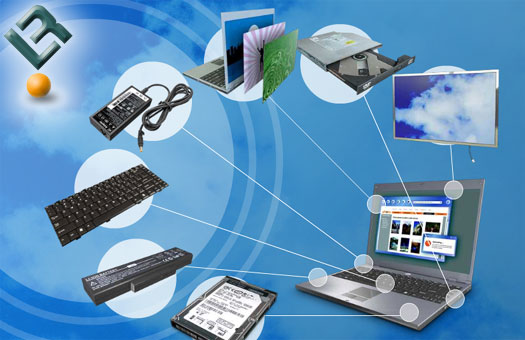
Image Description

Intel?s chief objective for the CBB program is to help expand the availability of a common set of cost-effective notebook computer ingredients, to reduce the risk of platform integration, and to stimulate the overall growth of the notebook market segment. The CBB has successfully developed a set of standards for the components that whitebooks use. Intel currently has set guidelines for the hard disk drive (HDD), optical disk drive, liquid crystal display (LCD) panel, battery pack, AC/DC adapter, keyboard, and requires a customizable notebook panel. Standardizing such components has been something many systems builders, who are looking at ways to reduce inventory and better service their customers have been wanting to do for years.

Image Description

Intel has a verification program in place that looks at notebooks built to be in the CBB program and our sources inside Intel let us know that it works and has caught a number notebooks trying to get around the system. Here is the list of barebone notebooks that have been tested for the interchangeability of the seven Common Building Block (CBB) components and have passed testing on all seven areas.

  • Asus S62Fp
  • Asus S62J
  • Asus S96F
  • Asus S96J (Pictures and Pricing)
  • Compal HGL 30
  • Compal HGL 31
  • Compal HEL 80
  • Compal HEL 81
  • Quanta SW1 (Pictures and Pricing)
  • Quanta TW3A
  • Quanta TW3M

Intel also has tested the following whitebook notebooks and found that they offer interchangeability of four Common Building Block (CBB) components. The following six notebooks have not passed testing for the AC/DC adapter, keyboard, and customizable notebook panel.

  • Clevo M660N
  • Clevo M665N
  • Gigabyte W451U
  • Gigabyte W551A
  • Gigabyte W551U
  • MSI 1034

In closing I have just got my hands on the ASUS S62J notebook, which has passed the verification process and is in the CBB program. When trying to order the customizable notebook panels from FedEx Kinkos I was unable to get my order placed after picking out my panel choice and entered all of my credit card information. The panels are all $15.10 at FedEx Kinkos and even allow for custom art work to be uploaded. The panels are treated with a pressure-sensitive adhesive on the back side for permanent or replaceable attachment, depending on the desired result. I'd like to use the replaceable adhesive, but FedEx Kinkos only carries permanent panels.

Other than the ordering issues with the panel the program seems to be working out nicely for Intel other than the fact that no one knows about it. Since profit margins have become so thin on notebooks and the fact that they tend to require more support than desktops many system builders haven't jumped on the notebook bandwagon. If you are one of those builders you might want to take a closer look at the 11 notebook models that are in the CBB program. With interchangeable parts it means you can stock one keyboard or battery and it will work on all of the notebooks! The Intel CBB program makes whitebook notebooks easy to service and support.

Other than customization and easier service Intel has also said these 11 notebooks are upgradeable. At first one might think that Intel means these notebooks can have more memory or a faster processor installed, but that is not the case here. Each of the 11 notebooks will support Intel's next generation dual-core mobile processor. Right now they all run Intel's Core Duo (Yonah) processors, but after a simple BIOS flash they will be able to support Core 2 Duo mobile processors (Merom). Speaking of Merom, how does a 20% performance improvement in 3DMark05 over the current Yonah processors sound? If you are looking for a notebook that wont be out dated, customizable, and easy to find parts for you have found your short list of whitebox computers.

in our forums. For those who are interested in building a whitebox notebook we have a thread listing all of the ones we can find in If you are curious about what companies make whitebox notebooks please check out this threadthis thread. As always feel free to post up any comments in our forums!

Intel Unleashes Conroe: X6800 and E6700 Reviewed

Let Me Introduce The New King Of The Hill: Conroe

Let me start off my saying that AMD has been the processor to have for gamers and enthusiasts over the past couple of years without a doubt. When Intel launched the Prescott core you could literally feel the breeze caused by consumers going from the Intel fan boy camp to the AMD side. The Intel Prescott faimly of processors were leaky and I even published an article examining prescott temperatures nearly three years ago explaining why the core temperatures were high. From the time the original Prescott core was launched till the end of it?s life the updates that Intel made to the core were nothing less than amazing. The initial Prescott processor that I reviewed back in 2004 was nothing like their last major update of the Prescott core one year to the month later in 2005. By adding more L2 cache, support for Enhanced Memory 64 Technology (EM64T), Execute Disable Bit, and the combination of EIST (Enhanced Intel Speedstep Technology), C1E (Enhanced Halt State), and TM2 (Thermal Monitor 2) the updated Prescott was finally looking like a production processor from Intel. The only problem was the fact that a year went by and since enthusiasts upgrade more than once yearly this was not a good move for Intel. While Intel was busy updating their desktop processor lines, AMD was busy playing catch up and consumers were jumping ship.

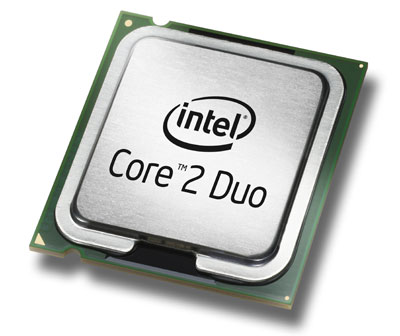
Intel Core 2 Duo Processor

Early this decade Intel had the performance lead and Intel processors came at a price premium as a result. Thanks to this AMD was kept alive early on by pricing their mainstream Athlon XP processors at near $100 and their market consisted mainly of dedicated enthusiasts and gamers looking for performance on a budget. I was one of those consumers back in the day and found that the first Athlon XP processors allowed great overclocking by having unlocked multipliers (RIP my beloved Athlon XP AGOIA stepping 1600+). Those are the days when VIA KT333 chipsets were the chipset to have and having 80mm delta screamers were the "in" thing. When AMD moved over to the Athlon 64 series they placed the memory controller on the processor itself and their new core turned out to be faster than Intel?s processors in a number of benchmarking scenarios, especially when it came to gaming performance. AMD saw what their main consumer group was doing with their processors and answered with a knock out blow at a time when Intel was promoting a leaky processor that came at a higher price. AMD Athlon 64 processors was crowned the CPU to have when it came to gaming computers and consumers were willing to pay whatever the price to have one.

The next race for both processor companies was marathon race to have dual-core processors. Intel won the race by bolting two Prescott processors together, which to this day leaves us wondering if it was worth it, but that is water under the bridge now. AMD came out with their dual-core processors dubed X2's a little later and once again had the performance to roll over Intel?s dual-core processors. AMD was able to take over the market lead for processor sales and the days of cheap AMD processors with unlocked multipliers across the board were long gone. AMD was now the lean mean fighting machine in green and was starting to give Intel a taste of what it feels like to be second in the processor market.

When you spent time at the top and have tasted victory it leaves a bitter sweet taste in your mouth. It's that sweet taste left in your mouth that you want back and the folks at Intel have just started to get their spot on top of the mountain back. Just this week Intel took the crown from AMD for being the number one processor in U.S. retail market for June and that's with the current processor lineup!

Today, Intel is introducing their next generation processor codenamed Conroe. This processor has had the most hype that I have ever seen and honeslty I jump right out and say that it doesn't fail to impress. Sit back and grab a pint or a tea and examine what just might be the next processor in your computer system.

$300 Gaming CPU's: AMD 5000+ Versus Intel E6600

I have $300 to spend. E6600 Conroe or 5000+ AM2?

Last week Intel introduced their Core 2 Duo Processors and Legit Reviews covered the announcement by releasing our thoughts on the Intel Core 2 Extreme Processor X6800 and the Intel Core 2 Duo Processor E6700. Both of the processors are at the top end of performance for desktop computers and come with top pricing as the X6800 running $999 and the E6700 coming in at $530. In case you missed our article here is a chart of Intel's upcoming processors and their pricing.

Processor
GHz
FSB
Cache
Package
July 23rd Price
X6800 2.93GHz 1066MHz 4M LGA775 $999
E6700 2.67GHz 1066MHz 4M LGA775 $530
E6600 2.4GHz 1066MHz 4M LGA775 $316
E6400 2.13GHz 1066MHz 2M LGA775 $224

With AMD being very open about their upcoming price cuts I figured that now would be a great time to look at the rumored prices that are all over the internet this week.

Processor
GHz
HT
Cache
Package
July 24th Price
FX-62 2.8GHz 2000MHz 2 x 1MB AM2 $799
5000+ 2.6GHz 2000MHz 2 x 512KB AM2 $299
4600+ 2.4GHz 2000MHz 2 x 512KB AM2 $224

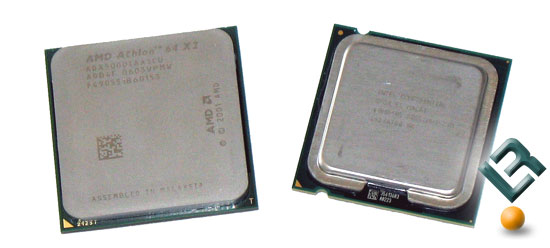
According to rumors and leaked information on the internet we are able to see that AMD is going to be cutting prices next week and the price cuts are serious. AMD does not want to give up the price versus performance segment and if these prices turn out to be true we know AMD is serious! Most of today's gamers play on a budget and are finding themselves with their graphics card as the most expensive piece of hardware in their gaming system. Today we take a look at a processor that gamers can actually afford those that are in the $300 price range. That means the E6600 from Intel and the 5000+ by AMD have to fight to the death to see who's the stronger gaming processor. Below the AMD Athlon 64 X2 5000+ AM2 and the Intel Core 2 Duo Processor E6600 meet for the first time and size each other up.

Intel E6600 and AMD 5000+ AM2

The Intel Core 2 Duo processor E6600 still features the larger 4MB cache size and comes priced just over $300 at $319. To compete with the Intel Core 2 Duo processor E6600 AMD is going to price down their AMD Athlon 64 X2 5000+ AM2 processor to just under $300. It's also interesting to note that the 5000+ is running at 2.6GHz, which is 200MHz faster than the clock speed on the 2.4GHz E6600 processor from Intel. It's been a long time since I've run gaming benchmarks where the AMD processor has a faster clock speed. It should also be noted that the AMD processor has 1MB of cache where the E6600 has 4MB.

Without going crazy on the technical details let's take a look at our test system and then see what processor deserves to be in our gaming PC. Since gamers use real resolutions like 1280x1024 and 1600x1200 with AA and AF enabled we ran our benchmarks with settings that you would use at home.

Let's take a look at our test systems and then jump into the games!

Overclocking the Intel Core 2 Duo E6300 Processor

For $193 a Allendale Can Be Yours!

With the Intel Core 2 Duo E6300 priced under $200 it's the processor that many mainstream and budget shopers are picking up for use in their back to school computer systems. We have found that this entry level Intel Core 2 processor might cost just $193 , but the performance that it offers is much more than what you're paying for. With a little extra work and buying the right motherboard the Intel Core 2 Duo E6300 is by far one of the best overclocking processors that we have ever seen on the test bench here at Legit Reviews. Today Legit Reviews takes the Intel Core 2 Duo E6300 Processor and overclocks it to see what that means in terms of real world performance.

Image Description

When it comes to pricing the Intel Core 2 Duo Processor E6300 is still selling for a slight premium on the market, but rightfully so as you will soon find out. According to the July 27th,2006 price sheet the E6300 processor lists for $183 when purchased by the thousand, so the market price of $193 isn't that much of a premium for buying a single processor. With the E6300 retailing for under $200 it's attainable by many, but with the Core 2 Duo Processor family does come some issues.

One of the main stumbling blocks for Conroe and Allendale is the lack of chipset options and the few number of boards on the market. If you want run NVIDIA SLI graphics and an Intel Conroe/Allendale based processor you are limited to one board choice that is currently available on the market and that is the ASUS P5N32-SLI SE Deluxe motherboard. All of the other boards use the Intel 975x or 965x chipsets, which both support ATI's CrossFire technology. For our overclocking adventures we stuck with the Intel D975XBX 'bad axe' reference motherboard as it's known for it's overclocking abilities within reason and is readily available. We did have to do some minor adjustments to our motherboard to help out overclocking functionality, but our modifications can be done by anyone that can use a pen or pencil.

Intel Core 2 Duo Processor T7600 on the Dell XPS M1710

Running the Intel T7600 on the Dell XPS M1710

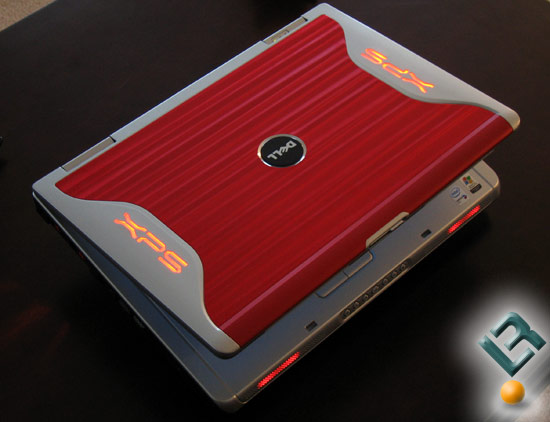
Laptops around the world are getting a performance boost as systems based on Intel Centrino Duo mobile technology are now shipping with Intel Core 2 Duo mobile processors starting today. With the launch of a new core many would suspect that a new socket or some sort of platform change would be needed, but that is not the case with the Core 2 Duo family of mobile processors. All that is needed is a BIOS update for the motherboard in the current Duo notebooks and all should be well. In all honesty I was able to install an Intel Core 2 Duo processor in our Do-It-Yourself based Clevo M570U 17" gaming notebook (Read the Review) and on our personal Dell XPS M1710 Special Edition Formula Red gaming notebook with no BIOS updates at all.

The Dell XPS M1710 with Intel T7600 Processor Installed

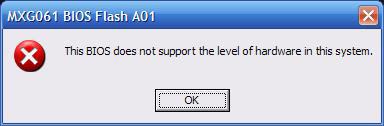
The Dell XPS M1710 Special Edition Formula Red gaming notebook ran our Core 2 Duo (formerly codenamed 'Merom') just fine with BIOS version A00 although it should be noted that BIOS version A01 wouldn't install with a Core 2 Duo processor installed. When we tried to install BIOS A01 we got the following error message.

Bios Install Error Window

With everything running fine with BIOS A00 we went ahead and used the Dell XPS M1710 Special Edition Formula Red gaming notebook for our benchmarking as it is the only notebook we have that features the 512MB NVIDIA GeForce Go 7900 GTX video card inside and we didn't want to be GPU limited during our testing. The other choice we had to go with was the Clevo M570U and while it ran the Core 2 Duo processor T7600 without any issues it only had a 256MB NVIDIA GeForce Go 7900 GTX, so we went with the Dell.

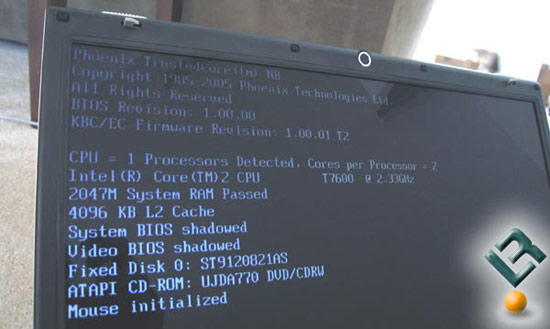
Correct BIOS Screen

Here is an image of the Clevo M570U posting and running the Core 2 Duo processor T7600 just fine with BIOS version 1.00.00 and upgraded to 1.00.02 with no issues at all. We also used Core 2 Duo on the ASUS Z97JS with pre-production BIOS V.080012 and the ASUS S96J with BIOS v0901. On the four notebooks we ran Merom on we had 100% success, but as you can tell it's hit or miss on the BIOS versions, so some research will need to be done before ALL updated and Core 2 Duo BIOS revisions are online. So to sum everything up if you've got a 945GM or 945PM Express chipset in your notebook, then the Core 2 Duo should be a drop in replacement for your Core Duo processor. If you don't have one of these chipsets then you'll need a whole new notebook to be able to run Core 2 duo processors!

Enough talk about BIOS revisions and let's take a look at Core 2 Duo!

Monday, April 6, 2009

Legit Reviews Visits Intel FAB 24-2 in Ireland

Taking The Tour of Intel's Leixlip Operations

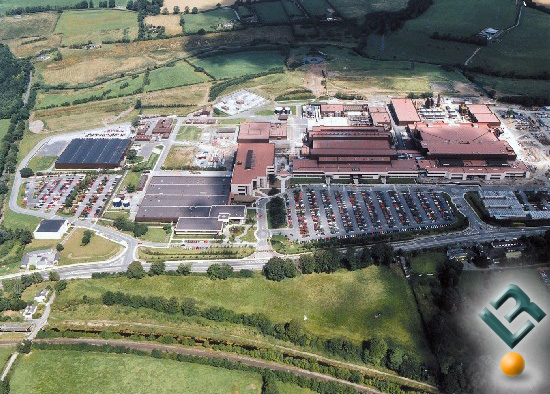
Intel Ireland includes two facilities located in Leixlip and Shannon. Intel currently employees 5,125 people at their Ireland locations and has been in operation there since 1990. Legit Reviews recently had the oppurtunity to go on a private tour inside one of the FABs over in Leixlip and we would like share that expierence with our readers. Leixlip, located in County Kildare, is a tranquil community of approximately 15,000 people located 20 kilometers (12.5 miles) northwest of Dublin, Ireland's capital. The Leixlip FABs are Intel?s largest and most advanced manufacturing facilities outside of the United States.

Image Description

Leixlip consists of a number of manufacturing facilities, FAB?s 10/14 & FAB?s 24 & 24-2. FAB 10& FAB 14 are known as Ireland FAB operations (IFO). They operate on a 0.25, 0.18, 0.13, 0.090 and 0.065 micron production process. Between these two FABS Intel can produce 65 individual, different products. The IFO covers approximately 130,000sq meters. It is also the only source of the P854 & P856 chips used in many routers etc. It should also be pointed out that Intel Ireland has an excellent environmental management track record. Its Environmental Management System is accredited to the ISO 14001 quality standard and as such is the first Intel plant to do so. If you look at the above picture of the plant you can tell that it is located in a rural area, so being environmentally friendly is important!

Image Description

FAB 24 is one of the leading FABS to run 300mm technology on a 90nm process. 300mm wafers allow for high output at lower cost. FAB 24 is 52,000sq meters, which includes a 15,000sq meter clean room. It was opened in June 2004 and originally produced the Pentium 4 line of chips. FAB 24-2 is Intel?s new baby. It was only opened this summer back in June of 2006. I say it?s Intel?s baby, because it produces chips on the 65nm level. This is currently the smallest manufacturing process used for CPU?s and its home to the new Core 2 Duo chips, aka ?Conroe?.

My adventure started early in the morning, I had to catch a local train out to Leixlip and then take a long walk to reach Intel. The first thing I noticed when I arrived was the security. Not long after I arrived I was greeted by our contact in the main reception and after a quick security check I was allowed to pass through a metal detector. I should mention that no cameras were allowed inside the FAB?s (I said security was tight), so the pictures you?ll see were taken for us by Intel.

Intel IHS Lapping and Removal For LGA775 CPU's

Giving Intel Core 2 Duo A New Appearance

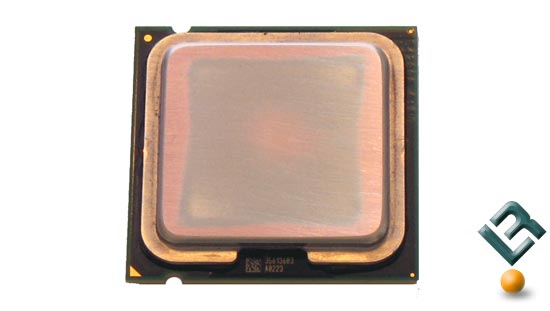
If you've maxed out your processor by overclocking and want to squeeze more out of it or are just looking to reduce core temperatures lapping the processor might be something worth looking into. All Intel LGA775 processors use the FC-LGA4 package, which means that the processor die is on top of the substrate on the opposite side from the LAND contacts. This package consists of a processor core mounted on a substrate land-carrier. An integrated Heat Spreader (IHS) is attached to the package substrate and core and serves as the mating surface for the processor component thermal solution such as a heat sink. Intel actually solders the IHS to the core of the processor, so the contact on the processor is usually not of concern. This brings us to the situation on hand. Many of the Allendale and Conroe processors that we have lapped have had heat spreaders that were not flat.

Intel LGA775 Conroe IHS Lapping

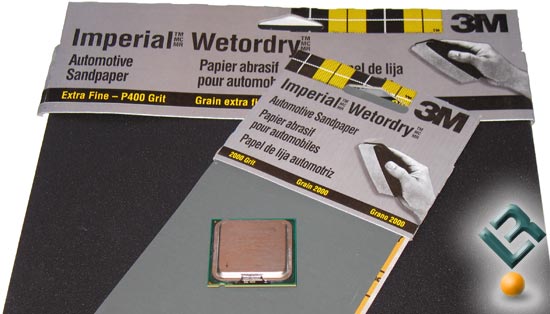
We went up to the local automotive supply store and picked up a number of different sandpaper packs ranging from 400 grit to 2500 grit. Using 2000 grit to 2500 grit sandpaper is far better than the factory finish, but for those that want to go crazy can invest in 1 micron diamond lapping compound to rub out all the sanding marks for a true mirror finish.

Intel LGA775 Conroe IHS Lapping

We took out Intel Core 2 Duo E6700 processor and started out lapping the IHS on a counter with 400 grit sand paper. After about 10 passes on the sandpaper it was obvious that the edges of the IHS were higher than the center, which means the hot core is not coming in direct contact with the base of our already lapped water cooling block.

Intel LGA775 Conroe IHS Lapping

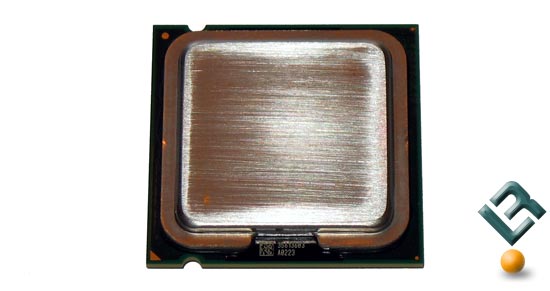
After a few minutes of 400 grit sanding we started to see copper that was previously hidden by the nickel plating that we have started to sand off. All Intel LGA775 processors feature copper integrated heat spreaders, so getting one of the flat will allow for great thermal transfer between the IHS and our copper water block. Once the block was flat and all the nickel was gone we moved on to finer sandpaper grits and called the surface of the IHS done after we used some 2500 grit paper on it.

Intel LGA775 Conroe IHS Lapping

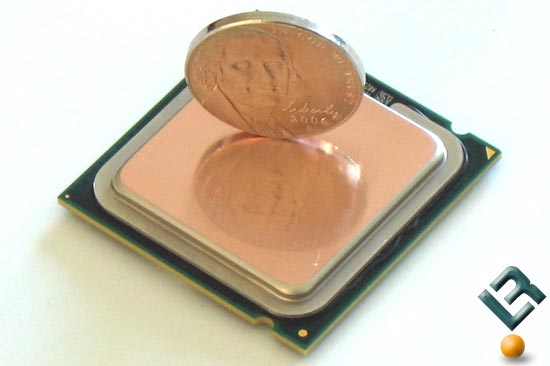
The final result of lapping the processor was amazing. For less than twenty minutes worth of work we were able to take our Intel Core 2 Duo processor from having an uneven IHS to having a perfectly flat top hat. We took our lapped Intel Core 2 Duo E6700 Processor and ran it in the ABIT AW9D-MAX motherboard and found that the lapping reduced the idle temperatures by 2-3 degrees Celsius. Before the lapping it would idle 34-35C and after we were seeing 31-32C. Before we took load temperatures we thought we'd keep going and removed the IHS all together.